
Waveshare ESP32-S3-Touch-LCD-1.28
Support for the Waveshare ESP32-S3-Touch-LCD-1.28 board
Support for the Waveshare ESP32-S3-Touch-LCD-1.28 board @author Gunar Schorcht gunar@schorcht.net @author Yahia Abdella yahia.abdella@tuhh.de
\section waveshare_esp32s3_touch_lcd_128 Waveshare ESP32-S3-Touch-LCD-1.28
Overview
The Waveshare ESP32-S3-Touch-LCD-1.28 is a compact development board built around the ESP32-S3 microcontroller with an integrated 1.28-inch round TFT LCD display and capacitive touch panel.

The main features of the board are:
- ESP32-S3-N8R2 SoC with 2.4 GHz WiFi (802.11 b/g/n) and Bluetooth 5, BLE
- 16 MB Flash
- 2 MB PSRAM
- 1.28-inch 240x240 round IPS LCD (GC9A01 driver)
- Capacitive touch panel (CST816S controller)
- 6-axis IMU (QMI8658 accelerometer + gyroscope)
- USB Type-C connector
- Battery charging circuit with battery voltage monitoring
- BOOT button (active low, directly usable as user button)
Hardware
MCU
Most features of the board are provided by the ESP32-S3 SoC. For detailed information about the ESP32-S3 SoC variant (family) and ESP32x SoCs, see section esp32_mcu_esp32 “ESP32 SoC Series”.
Board Configuration
The board integrates a 1.28-inch round IPS LCD driven by a GC9A01 display controller via SPI, a CST816S capacitive touch controller connected via I2C, and a QMI8658 6-axis IMU also connected via I2C. A BOOT button on GPIO0 is directly usable as a user button.
The default board configuration provides:
- 1 x ADC channel (battery voltage monitoring)
- 1 x SPI (display)
- 1 x I2C (touch controller and IMU)
- 1 x UART (console)
The following table shows the default board configuration sorted by peripheral function. This configuration can be overridden by esp32_application_specific_configurations “application-specific configurations”.
For detailed information about the peripheral configurations of ESP32-S3 boards, see section esp32_peripherals “Common Peripherals”.
Board Pinout
The following figures show the board hardware layout.
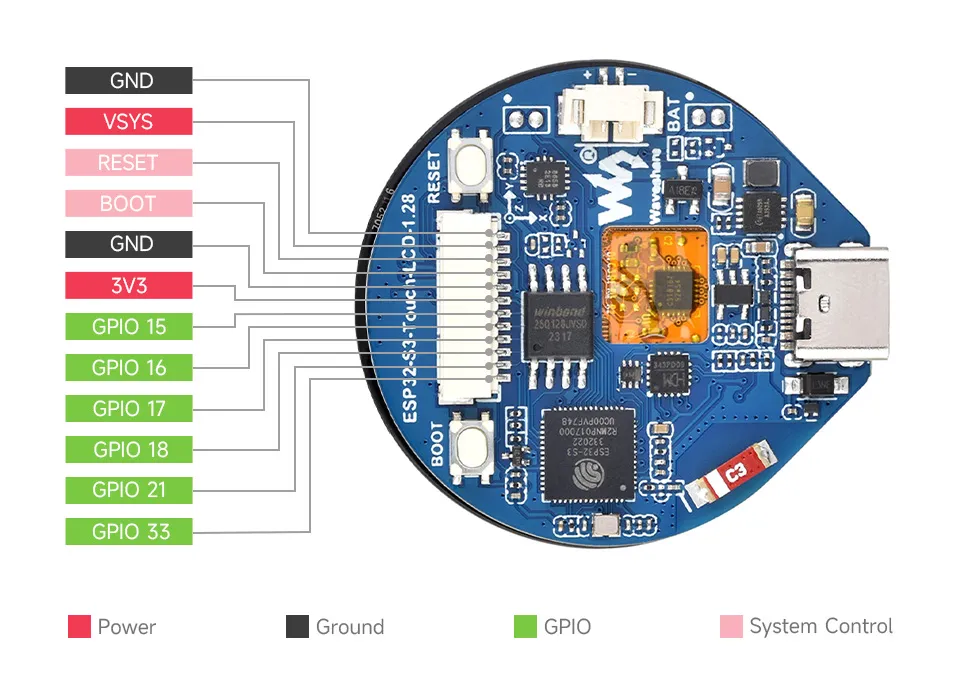
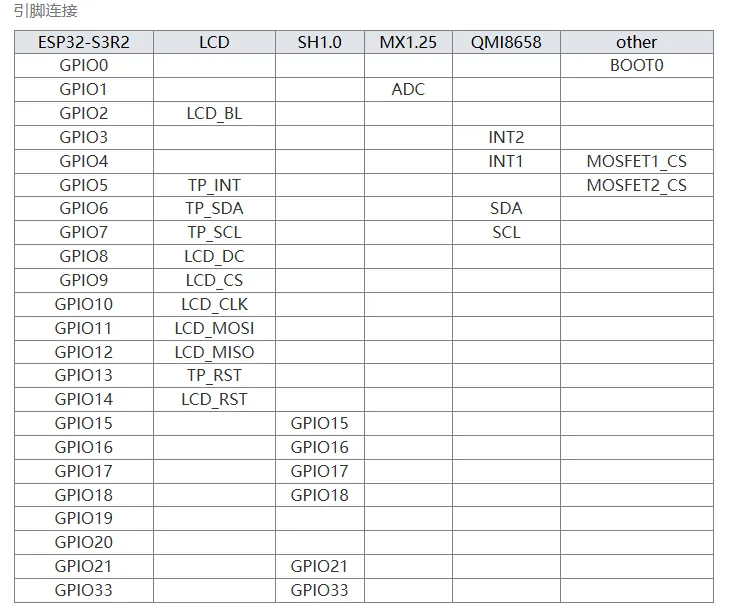
The board schematic and additional documentation can be found on the Waveshare Wiki.
Flashing the Device
Flashing RIOT is quite easy. The board has a USB-C connector with reset/boot/flash logic. Just connect the board to your host computer and run: For detailed information about ESP32-S3 as well as configuring and compiling RIOT for ESP32-S3 boards, see esp32_riot.